Showing posts with label Blackberry Social Application. Show all posts

IM+ Pro v10.5.1

Posted by Zberry on 28 Apr 2013

[Image: im+_pro_10.5.1.png]

IM+ Pro supports all major IM services, including Facebook, Skype, MSN/Live Messenger, Google Talk, Yahoo!, AIM/iChat, ICQ, Mamba.Ru, Mig33, SINA Weibo, Odnoklassniki.Ru, Jabber, VKontakte, Yandex IM, RenRen, Gadu-Gadu and Mail.Ru Agent. We thought you might want to check up on Twitter while messaging, so we added support for it, too.

NEIGHBORS offer a totally new dimension of communication in IM+ Pro by providing you the opportunity to find new real life connections and friends with common interests in your local area. See who's your Neighbor on the map, dive into local group conversations, "shout" to ask your neighbors questions that are important for you. It's all about your local community!

Below you may find the list of other amazing features which will definitely take your mobile IM experience to the next level:
- Send text messages, photos, videos, and voice notes
- Group chats in Skype, MSN, AIM, ICQ.
- Chat history, accessible in IM+ on your device and from any web browser at https://plus.im
- Create personal status messages
- Typing notifications
- Customize your IM+ look and feel with custom sound notifications and emoticons
…and we're not done yet, new IM+ features will keep coming!

Follow @implus on Twitter and Like http://www.facebook.com/plusim to get the latest updates from IM+ team!

This product uses Skype™ but is not endorsed or certified by Skype.

TRADEMARKS:
IM+ョ is a registered trademark of SHAPE.
AIMョ is a registered trademark of AOL LLC.
ICQョ is a trademark owned by ICQ.
Yahoo!ョ is a registered trademark of Yahoo Inc.
MSNョ, Windows Live™ are registered trademarks of Microsoft Corporation.
Jabberョ is a registered trademark of Jabber Inc.
Google™ Talk is a trademark of Google Inc.
Facebookョ is a trademark of Facebook, Inc.
Skype™ is a trademark of Skype Technologies S.A.

App World : http://appworld.BlackBerry.com/webstore/content/439
Download: http://appkita.com/v1/sosnet/im
More about → IM+ Pro v10.5.1

Email Blocker Blackberry

Posted by Zberry

Sadly, spam is a fact of life. Spammers are always thinking up new ways to get around security.

If you looking for a spam mail blocker, you are on the right page.

You can easy to block all these spam mail by Email Blocker.

Feature:
* Block Contact
* Block Email Address
* Block Email Contents
* Block Unknown Email
* Icon Notification
* LED Notification

File Size: 341 KB
Required: 5.0.0 or higher

v2.0.1
OTA
OFFLINE
More about → Email Blocker Blackberry

Bom PIN Blackberry 1.2.0

Posted by Zberry


This is Bom PIN Blackberry. New version is coming with stable version. :)


DOWNLOAD
OTA
More about → Bom PIN Blackberry 1.2.0

Simsimi Indonesia

Posted by Zberry on 8 Jan 2013

Simsimi is a friend you can talk to about subjects ranging from ordinary chitchat to the more personal. Its attractiveness comes from its uniqueness, in that Simsimi can be virtually taught just about anything. Simsimi is still a baby: Cute, cuddly, curious but at the same time naughty and mischievous, which is typical of small children, is what makes it hard for us to look away from Simsimi.

This is a form of entertainment where users can interact with Simsimi; a conversation similar to one in the real world and also an ability to teach Simsimi all you want. Be forewarned that this is unlike talking to your friend. Simsimi’s response can be more shocking, ridiculous, annoying, pathetic, make you frown, and even make you shake your head in disbelief.

Equipped with artificial intelligence, Simsimi exists to make leisure time more enjoyable. Although not a true form of Artificial Intelligence (AI), Simsimi’s ability to engage in a conversation is determined by the words being taught to it. As more words, sentences, and expressions are taught to it, Simsimi will get smarter which will present a more interesting and exciting experience to the user.


DOWNLOAD OFFLINE DROPBOX

More about → Simsimi Indonesia

Past Chat - Send BBM Chat History to your Email v.1.0

Posted by Zberry on 25 Aug 2012

With Past Chat you can email your BlackBerry Messenger Chat History to you email address in an easy to read excel file format.

Features:
See all you Contacts listed by Pin Number, Easy to add names
Search BBM Pins
Even the deleted contacts history can be retrieved and sent to email

IMPORTANT
1. BBM is a very secure application so we cannot extract display names of your contacts, we can however extract their BBM PIN numbers.
2. Past Chat allows you to assign a Contact name to a PIN number so once you have setup Pastchat you will have all your contacts listed by name rather then PIN number.
3. Some patience, Copy and Pasting between BBM and PastChat is required but once done it will be saved and you can feel free to update and use the app all you like.

Supported Models:
All Devices with OS 5 and higher


DOWNLOAD


More about → Past Chat - Send BBM Chat History to your Email v.1.0

ChatPeek for BBM Pro v.1.1 - Popup for BBM Read your BBM Message without "R" (BBM Connected)

Posted by Zberry on 19 Aug 2012


Chat Peek for BlackBerry® Messenger is a very handy application that allows you to read BBM™ message via a screen popup. This popup will appear even when you are actively using another application on phone. No more hassle to open BBM™ just to check the latest messages!

Unlike our competitors, this application provides options to automatically disable popup when a certain standard application is active. Selectable applications include: BBM™, Browser, Camera, Google Maps, etc. No more annoying popup whenever you are already on BBM™ or when you're playing real-time games.

Whenever a popup appears, you have the option to hit the Escape button to close the popup.

Additional features:
*Switch the application On/Off
*Options to automatically disable popup when a certain standard application is active. Selectable applications include: BBM, Browser, Camera, Google Maps, etc.
*An option to set popup transparency level
*An option to set display timeout duration
*Click an icon that takes you to BBM application directly to reply

Features In-Progress:
*From the popup, users can view popup history which shows all new messages by each sender.
*Users can also disable popup when downloaded application (e.g. games) is active.

*Read your BBM Message without "R"

- BBM Connected -

Required :
OS5 or higher

*Support OS7+


DOWNLOAD
OTA
OFFLINE

More about → ChatPeek for BBM Pro v.1.1 - Popup for BBM Read your BBM Message without "R" (BBM Connected)

LINE messaging app for BlackBerry v1.0.3

Posted by Zberry

A few days ago some images of a new chat application started appearing. Looking into it further, we found out the app was LINE, a rather popular chat application for iOS and Android in different regions. The excitement came from BlackBerry users in those areas, as the app was soon to be available for BlackBerry. Now here we are, a few days later and the app is available for download in BlackBerry App World. Like most other chat applications available, it packs a lot of features into it:

  • Easy, Fun and Convenient: Send messages and photos in an instant!
  • Link your Smartphone - PC - Tablet: Use the smartphone version while on the move, PC/MAC versions on your desktop, and a web-browser version for tablets. Stay in touch wherever life may take you! (No PlayBook version directly)
  • Lots of Stickers: Convey your emotions and make your chats more fun with a huge variety of fun stickers! There are 4 free sticker-sets waiting to be downloaded by you.
  • BBM™ Integration: Easily check the latest info on updates with BlackBerry® Messenger integration. (Supported for OS5 or higher. For OS6, LINE can only be installed on BBM ver.6.0 or higher)


Having given it a quick run through earlier, there is some stuff to like about it but also some stuff that you may not like. The stickers are cool, the app is fairly quick and it looks great but quite few things make me not want to use it.

The set up process isn't really intuitive, the adding of friends isn't intuitive and in order for it all to work better, you have to upload your contact database to their servers. Granted, they do ask you beforehand so bonus points there but reading their privacy policy is certainly recommended. If you're not concerned with any of that, you'll find the link below.

Required :
OS5 or higher


DOWNLOAD OTA
OS5
OS6
OS7+

DOWNLOAD OFFLINE
OS5
OS6
OS7+
More about → LINE messaging app for BlackBerry v1.0.3

WhatsApp 2.7.9379 (update)

Posted by Zberry


WhatsApp adalah aplikasi messenger yang ada di smartphone dengan basic mirip BlackBerry Messenger. WhatsApp Messenger adalah aplikasi pesan lintas platform yang memungkinkan kita bertukar pesan tanpa membayar untuk SMS, karena WhatsApp Messenger menggunakan rencana data internet yang sama untuk email, browsing web, dan lain-lain, sehingga tidak menggunakan biaya untuk dapat tetap berhubungan. Aplikasi WhatsApp Messenger adalah pengiriman pesan yang menggunakan koneksi 3G atau WiFi untuk berkomunikasi tanpa harus mengeluarkan biaya. Dengan menggunakan WhatsApp, kita dapat melakukan chatting, file sharing, dan lain-lain.


More about → WhatsApp 2.7.9379 (update)

Trillian 1.1.0.45 (Full)

Posted by Zberry on 4 May 2012

Trillian for BlackBerry® helps you organize and stay in touch with your IM and social friends while on-the-go. Receive notifications, send pictures and messages, and optionally synchronize with Trillian for Mac, Windows, and Web. Trillian for BlackBerry has been designed to seamlessly integrate with your phone and boasts a clean and concise user interface for all of your chatting needs. You can even use Trillian to Trillian messaging to save on SMS costs!

BASIC FEATURES:

* Astra, MSN®, Facebook Chat, Yahoo®.
* AIM/ICQ®, Google™, MySpaceIM, Jabber.
* Clean BlackBerry design with black and white themes.
* Multiple account support and login screen.
* Email push notifications.
* All password transmissions encrypted.
* Reliable under low-bandwidth conditions.
* Strong emphasis on stability and bug fixes.

CONTACT LIST:

* Basic group management.
* Edit contact display names.
* Optional display of contact avatars.
* View contact information (e.g. AIM profiles).
* View, group, or hide offline contacts.
* Sort contacts by status or name.
* Privacy options - block, invisible, etc.

CHATS:

* Send pictures, buzzes, and URLs.
* Typing notifications.
* Copy/paste support.
* Emoticons.

PREFERENCES:

* Global status control with status messages.
* Control sounds, vibrations, and LED color.
* Avatar changing from camera or picture library.
* Local display name changing.
* Configurable sign off time (up to 7 days).
* Set away when closing app.

DOWNLOAD
OTA OS5
OTA OS6-7
OFFLINE OS6-7
More about → Trillian 1.1.0.45 (Full)

IM+ PRO: All-in-One Messenger v10.2

Posted by Zberry

The big all in one messenger app got an update with some big improvements.

So what is in the update?

Fixed application menu issue
RenRen instant messaging service
Interface optimizations
Bug fixes and performance improvements

DOWNLOAD
ota
offline

More about → IM+ PRO: All-in-One Messenger v10.2

FaceBook for BlackBerry v3.1.0.7 Beta Update

Posted by Zberry on 3 May 2012

What's New?

New features of Facebook for BlackBerry smartphones 3.1 include:
Group Support
Liking Comments
Child Protection Support
For more detail, as well as application screen shots, please head on over to the “What’s New?” tab!

How can I provide feedback?
Discussion Boards: The best way to provide feedback on the application is to use the program discussion boards. You can use the boards to provide comments or suggestions on the application, as well as report bugs, request features and chat with other Facebook for BlackBerry 3.1 users.
Surveys: To gather specific feedback on the application, we will ask you to complete various surveys throughout the course of the beta program. These will be used to gauge what you think of the application as a whole, and how we can improve it to better meet your needs and expectations.
Feature Requests & Current Issues: The Feature Requests and Current Issues tabs are a quick and easy way to let us know what product bugs you are experiencing, as well as rate the most popularly requested features with just the click of a button! If your issue or features isn’t listed simply head on over to the discussion boards and let us know; we’ll be sure to update it as soon as possible as we’ll be adding to these lists daily - don’t forget to check back in and vote!
Let's Get Started!

Now that we’ve taken care of all the details, let’s get down to business! Download the latest software from BlackBerry Beta Zone by going to the “Download” tab. Take a look around, enjoy the application for a bit then come back and join in on the discussion with other Facebook for BlackBerry 3.1 beta testers – we can’t wait to hear what you think!

If you have any other questions or concerns, please let us know on the discussion boards and we will be happy to assist you.

Thanks again, looking forward to hearing your feedback!

^Michael

Here's a look at the new product features in Facebook for BlackBerry:

Liking Comments
You spoke and we listened! A very popular feature request is now available in Facebook for BlackBerry smartphones 3.1 as you can now like/unlike comments from within the comment screen. The new version of Facebook for BlackBerry also gives you the ability to see the Facebook users who have liked a post.

Posted Image

Feature Breakdown:
Ability to like/unlike each comment from within the comment screen
If a user likes/unlikes a comment, an outgoing notification is populated in their notification list
News Feed like rendering
If someone has liked my comment, the current user will be notified through pre-fetching or background polling.
The likes list allows users to see the Facebook users who have liked a post
Split of the single comments and likes field in details screen, to separate comments and likes fields. Comment count is not focusable in details screen.
Ability to open likes list screen from posts, photo posts, and comments by clicking on likes field
Up to 25 likes are retrieved
Ability to click on a user in a likes list screen and view the user's profile
Ability to view menu options of each user in likes list
Removal of detailed like names from details screen
Feature Limitations:
Push notification are not supported if someone has liked my comment
Only up to first 25 Likes are populated in Likes list screen; no support for Automore/Pagination
Cannot retrieve next pages of likes beyond the (up to) 25 initial
‘Page’ objects that like have profile pics exceed their expected dimensions
The number of likes listed in the likes list screen may not be the same as the count displayed on the post details or newsfeed
Group Support
The new Facebook for BlackBerry also allows you to view and interact with Facebook Groups. Users can now view their Groups from within the application as well as write, comment and like posts on the Group Wall.

Posted Image

Posted Image

Feature Breakdown:
Opening a group notification will open the group screen
Group screen will display the group name, privacy, wall, and description.
Users’ can write on the group wall, comment, and like group posts.
Group List Screen: From the navigation grid, the Group List screen is opened when a user clicks on the Groups icon. The Group List screen will contain a list of groups the user is a member of, according the bookmark order specified by Facebook. Each group will contain a profile photo and the group name.
Group Screen: From the Group List screen, or from a Group notification, a user can open the Group screen. The Group screen will show the group profile photo, group name, and privacy settings. A user can see the group wall, and post text messages to the wall. A user can see the group description, and also open the Group Members screen.
Group Members Screen: From the Group screen, a user can open the Group Members screen. The Group Members screen will show a list of members of the group in alphabetical order
Feature Limitations:
Group icon may not match with the icon displayed on the Facebook website
Users cannot upload photos or check-in to a group
Posts related to group activity (e.g. people joining a group, or changing the description of the group) will not be displayed on the group wall
Posts related to photo activity within the group will not be displayed
No caching of the group list. As a result, each time the screen is opened, the list will need to be retrieved from the network.


DOWNLOAD OTA
OS6
OS7
OS7.1
More about → FaceBook for BlackBerry v3.1.0.7 Beta Update

PhonePlus v1.0.0 (Full)

Posted by Zberry on 2 May 2012

PhonePlus is a small app that can do many things for you:
1. Vibrate on call connect/disconnect
2. save incoming/outgoing call to calendar
3. notify you in predefined interval when your calling.
4. auto add signature when sending sms.
5. save sms to txt file
6. insert contact info into email.
7. insert text emoticon into email
8. add call log to addressbook/calendar/task/memopad
9. add calendar events to task.
10.add task to calendar event.
11. add memo to calendar/task/sms/email
12. save memo to text file.

it's powerful, all-in-one handy app.

Required :
OS 5 or higher

*Support OS 7

DOWNLOAD
ota
offline
More about → PhonePlus v1.0.0 (Full)

UberSocial for Twitter & Facebook updated to v1.352 in App World w/Change log Support 0S 4.6 - OS 7.1

Posted by Zberry

UberSocial for Twitter & Facebook has been updated to version 1.352 in BlackBerry App World. UberSocial sets the standard for performance and functionality on BlackBerry. Many of the features common across Twitter today were created first on UberSocial.

CHANGE LOG ON v1.352
1. Removed/replaced all of the deprecated Twitter API calls
2. Updated copyright statement
3. Increased tweet cache max to 3000 tweets
4. Fixed dealbox indicator showing even when user had it turned off
5. Fixed bug which could cause significant battery drain in some instances
6. When logging out of facebook, also cleared the cache of the facebook newsfeed

DOWNLOAD Offline For OS 4.5/5.0/7.x
More about → UberSocial for Twitter & Facebook updated to v1.352 in App World w/Change log Support 0S 4.6 - OS 7.1

Nobex Radio for BlackBerry updates to v3.5.3 in App World Integrate BBM 6

Posted by Zberry

Nobex Radio for BlackBerry updates to version 3.5.3 in BlackBerry App World. Listen to radio stations in your country for free! (With the premium version you can listen to over 16,000 radio stations from more than 100 countries). Streaming is done either over WiFi, or through the carrier’s network.

DOWNLOAD
More about → Nobex Radio for BlackBerry updates to v3.5.3 in App World Integrate BBM 6

BlackBerry Messenger 6.2.0.51 (BetaZone)

Posted by Zberry

Based on your feedback, we've added some new features to BBM!

Posted Image

Animated display pictures

More animated display pictures are now built into BBM. Change your picture to suit your mood.

Posted Image

Change your name or message inline

You can quickly change your name or status message without leaving your contact list by clicking the text at the top of the screen. To exit inline editing, just scroll down. You can still access your profile screen by clicking your display picture.

Posted Image

Streamlined voice notes

When your convenience key set to open BlackBerry Messenger, if you highlight a contact in BBM and press the convenience key, you can start recording a voice note. Once you're done, pressing the convenience key again will send the voice note. Group chats. You can return to the default color at any time.


BlackBerry Tag enhancements

Adding contacts has never been easier. If your BlackBerry smartphone supports NFC technology, you can turn on the Allow Automatic Invitations by Tapping option. Then, as long as you or someone else has BBM open, you can add each other as contacts by aligning the backs of your smartphones.
This feature requires that you both have the latest version of BBM installed on smartphones that support NFC technology.


Improved search

When typing the name of a contact or group, the search ignores special characters and emoticons to make it easier to find what you're looking for.


Resend a message

If a message didn't send (for example, if your smartphone was outside of a wireless coverage area), you can highlight the message and select Resend from the menu.

Fixed Issues

- Broadcast Messages Url with Black Text
- Broadcast Messages with Purple Text

Known Issues

- Highlighting a BBM contact displays a different contact’s display picture.
- Pressing the convenience key while the menu is open in a chat returns the user to the contact list if the chat is opened from the Messages application.
- Scrolling quickly in the inline edit view allows the focus to move out on to the user’s avatar.
- Pressing the Enter key while the focus is on the user’s avatar initiates the inline edit view.
- Some smileys remained as text in a message sent to a multiperson chat for all participants.
- Send voice note dialog buttons are cut off in landscape mode when the virtual keyboard is displayed.


DOWNLOAD
OS 5 Full, Shrink dan Full Shrink
OS 6 Full, Shrink dan Full Shrink
OS 7.1 Full, Shrink dan Full Shrink

 
More about → BlackBerry Messenger 6.2.0.51 (BetaZone)

Yahoo Koprol v2.1.0

Posted by Zberry on 29 Apr 2012


Yahoo! Koprol is a mobile community that allows you to chat with people nearby!

Yahoo! Koprol has a growing directory of places where you can "check-in" and trade comments, share photos and review, with your friends and other people nearby.

While most social networks make you stay in front of the computer, Koprol goes with you as your all around town and find friends to meet in real life.

More about → Yahoo Koprol v2.1.0

Twitter for BlackBerry 3.0.0.20 OFFICIAL

Posted by Zberry on 27 Apr 2012

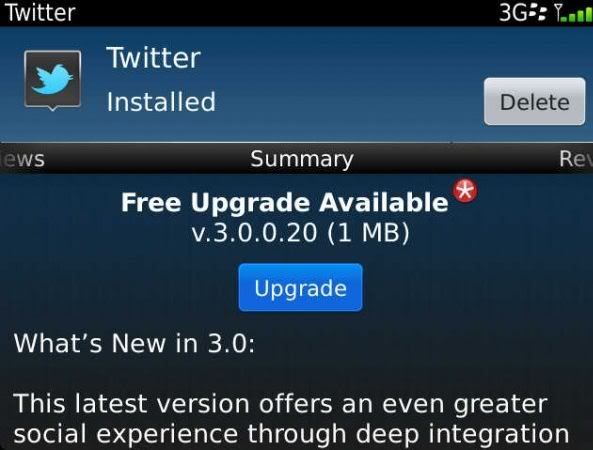
Research In Motion has officially released Twitter for BlackBerry 3.0 in BlackBerry App World.

What’s New in v3.0.0.20

This version offers an even greater social experience through deep integration with BBM. As a BBM connected application, you can share your latest Tweet as your BBM Personal Message.

The update should be pushed to you, but if not hit ALT+R+S+T to clear App World’s cache and restart it.

Download : Blackberry AppWorld

DOWNLOAD OFFLINE OS 5 - 7.1
More about → Twitter for BlackBerry 3.0.0.20 OFFICIAL

Facebook for BlackBerry updates to v.3.0.0.17 OS 5 - OS 7.1

Posted by Zberry


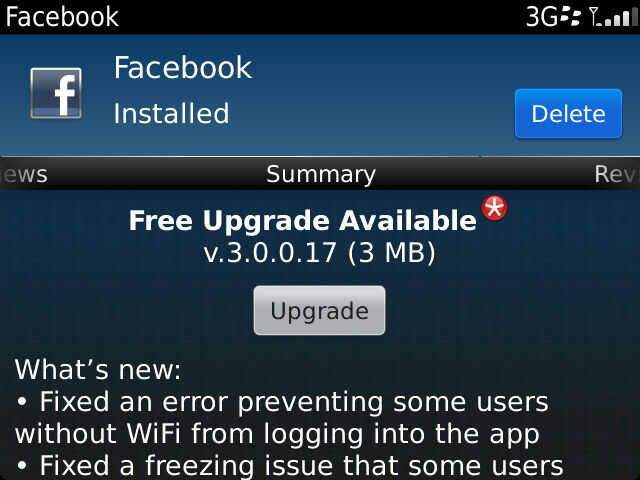
Facebook for BlackBerry update to v3.0.0.17 in App World

Facebook for BlackBerry updated to version 3.0.0.17 in App World, looks like it is just couple bug fixes and performance improvements.

What’s New in 3.0.0.17:
- Fixed an error preventing some users without WiFi from logging into the app

- Fixed a freezing issue that some users encountered when becoming BBM connected

DOWNLOAD
OTA 

OFFLINE 
More about → Facebook for BlackBerry updates to v.3.0.0.17 OS 5 - OS 7.1

Facebook Messenger for BlackBerry updates to v1.1.214

Posted by Zberry on 25 Apr 2012

Facebook Messenger for BlackBerry updates to v1.1.214 

Facebook Messenger for BlackBerry updates to v1.1.214 


DOWNLOAD 

 OTA

OFFLINE 

More about → Facebook Messenger for BlackBerry updates to v1.1.214

Rocket Chat Pro Chat Facebook For all Device

Posted by Zberry

Rocket Chat for Facebook

Rocket Chat is the best facebook chat application for BlackBerry® designed to be easy to use, small in size, and reliable.

Features:
- Easy to use and responsive user interface
- Stay connected with your friends all the time
- Smileys
- Send offline messages
- Small memory footprint
- Low battery consumption
- Incoming message notification
- East asia characters support
- Writing a message notification
- Message delivery status
- Human friendly time display

tags:
facebook, facebook chat, facebookchat, face book, face book chat, facebook im, im, facebook instant messaging, facebook instant messager, chat facebook, im facebook, chat, facebook messager, facebook messaging, facebook message, facebook update, facebook friends, chat with facebook friends, chat with facebook friend, facebook friend, facebook messages, facebooks, facebook chats, facebook ims, chat facebooks, facebooks chats, facebooks chat, facebook BlackBerry, facebook chat BlackBerry, BlackBerry facebook, BlackBerry facebook chat, facebook BlackBerry im, facebook im BlackBerry, facebook online, facebook text, facebook sms, facebook inbox


DOWNLOAD
appworld
offline
More about → Rocket Chat Pro Chat Facebook For all Device